 Kiln
KilnHow Kiln works
One idea: your site is the CMS.
Kiln edits plain HTML sites in place. Your pages stay plain HTML in a GitHub repository connected to a host that redeploys on every push (Cloudflare Pages, Netlify, Vercel, GitHub Pages). When an editor changes something, Kiln fetches the page's own HTML from GitHub, splices the change at exact source offsets, and commits. Your pages are the content: Kiln keeps no copy of them anywhere else. Every edit is a commit, and the host’s automatic deploy is the publish button.
Two small pieces make it work: a Cloudflare Worker that handles sign-in and coordinates every commit, and a GitHub App that grants repo access. Who runs those two pieces is the only difference between the plans:
- Self-hosted: you run both. Free forever, open source (AGPL-3.0).
- Kiln Cloud: we run both; you keep your repo and host. $4.99/mo per site.
- Fully managed: we run everything, hosting and setup included. $14.99/mo per site.
The editor is the same on all three, with one exception: AI assist needs an AI key on a worker you run, so it is Self-hosted only. How it works has the full comparison.
Install: self-hosted
You run the sign-in & commit worker and your own GitHub App. Free forever. Plan on 30 to 45 minutes the first time, Google sign-in for your editors included.
npx github:kilncms/kiln#release in your site's folder. The wizard does every scriptable step and waits while you click the few buttons only a human can. Already installed? npx github:kilncms/kiln#release doctor health-checks everything. The steps below are what the wizard does, written out. Read them to understand the moving parts, but pick the command or the manual path, not both.Starting from nothing, or leaving a builder
npx github:kilncms/kiln#release new [dir]: scaffold a fresh site from a template repo (--from owner/repo), de-personalized, git-initialized, wizard-ready.npx github:kilncms/kiln#release rescue <url>: crawl a Squarespace, Wix, or WordPress site into a clean, self-contained static copy (assets localized, builder runtime stripped, lazy images fixed) and auto-tag it for Kiln. It copies up to 50 pages (--max-pagesraises that), each asset up to 5 MB and 25 MB in all, and writesRESCUE-REPORT.md. What ran on the builder’s servers, such as a shop, bookings or a members login, does not come across. Then push the folder to GitHub, connect a host, and run the setup command in it.
If your AI built a React app (Lovable, v0, Bolt)
Kiln edits HTML files. A site made with Lovable, v0 or Bolt is usually a React app: the file the server sends is an empty shell and the words are added by script in the visitor's browser. There is nothing in it for Kiln to edit, and plain rescue copies nothing useful. Freeze the site into HTML first:
npm install playwright-core   # small, downloads no browser
npx github:kilncms/kiln#release rescue https://your-site.lovable.app --render --menu-shim--render opens every page in a browser already on your machine (Chrome, Edge, Brave or Chromium), waits for the app to finish, and saves what it sees as plain HTML with its pictures and styles. The app's own scripts are removed, so the page can no longer redraw itself over your edits, and every page gets Kiln's two script tags. Add --try to serve the folder and click a word straight away, with nothing published. If you used --try, delete assets/kiln-config.js afterwards, as the report says. Then push the folder to GitHub and set Kiln up as you would for any plain HTML site.
What it costs, said plainly:
- Anything that needed the app to keep running stops. Forms sent by script, sign-in, search, carts, filters, tabs, accordions, carousels, counters, and anything read from a database. They are still drawn and no longer work, and whatever a closed accordion was hiding is not in the copy.
RESCUE-REPORT.mdin the folder lists each one, page by page. - The phone menu needs
--menu-shim. It adds one small script that opens and closes the menu. Sub-menus inside it do not open. - There is no way back to the builder. From here on the site is changed in Kiln or by editing the HTML. A new export from the AI builder has to be frozen again, and your Kiln edits are not in it.
- A page that differs on every visit (a rotating headline, a live number) keeps whatever the first visit showed. The report names those pages.
Good fits: a brochure site, a portfolio, a landing page, a restaurant or a trades site. Poor fits: anything with accounts, a cart, a dashboard, or content that comes from a database. A site behind a sign-in cannot be frozen at all. The command was tried on three real sites, one each from Lovable, Bolt and v0, and each came across looking the same at desktop and phone width.
1 · Host your code on GitHub, your site anywhere
- Push your static site (plain HTML, CSS, JS) to a GitHub repository. This is where your code and content live.
- Connect the repo to a host that auto-deploys on each commit. Cloudflare Pages is recommended (free, commercial use allowed): in the Cloudflare dashboard go to Workers & Pages → Create → Pages → Connect to Git, pick your repo, leave build command empty and output directory
/, then Deploy. - Vercel, Netlify, and GitHub Pages work the same way. Any host that redeploys from a Git push is a valid Kiln host.
2 · Deploy your sign-in worker
This worker is yours. It runs on Cloudflare Workers (free tier) and is the piece that signs editors in and coordinates every commit to your repo. The wizard deploys it for you. By hand, start with:
git clone https://github.com/kilncms/kiln && cd kiln
npm install
cd worker
npx wrangler kv namespace create KILN   # note the id it prints
Then make your own configuration before you deploy. worker/wrangler.toml in the repo is our own worker's file and cannot be deployed from another account; worker/wrangler.example.toml is a complete one for yours:
cp wrangler.example.toml wrangler.self.toml # your own config; git ignores itIn wrangler.self.toml set three things: a name for your worker, the id under [[kv_namespaces]] (the one the command above printed), and ALLOWED_ORIGINS, your site's address, like "https://example.com". Sign-in from any other address is refused.
npx wrangler deploy --config wrangler.self.tomlNote the URL it prints, like https://kiln-auth.yourname.workers.dev. Because the worker lives on a plain workers.dev URL, OAuth callbacks are registered automatically at app-creation time in the next step. The same steps, with more detail, are in the self-hosting guide.
3 · Register your own GitHub App in one click
- Open
https://YOUR-WORKER.workers.dev/setupand press the button. The app registers under your account via GitHub's manifest flow and the worker captures its credentials. You never copy a secret. - Click Install, choose Only select repositories, and pick your site's repo. Kiln can only ever touch repos you select.
- If you did not set
ALLOWED_ORIGINSto your site's address in step 2, do it now in yourworker/wrangler.self.tomland deploy the worker once more.
4 · Make your HTML editable
Create /assets/kiln-config.js (see Configuration), copy kiln.js, kiln-editor.js, and kiln-features.js from the Kiln repo's dist/ into your site's /assets/ (kiln-features.js is lazy-loaded by kiln.js for galleries, filters, and calendars; leave it out and those 404 for visitors), and add two script tags at the end of <body> on every page:
<script src="/assets/kiln-config.js"></script>
<script src="/assets/kiln.js" defer></script>
Then annotate what's editable (the one step the wizard can't decide for you, though an AI can: see the annotation reference):
<h1 data-cms="headline">Welcome</h1>
<img data-cms="hero" data-cms-attr="src" src="/img/hero.jpg">
<div class="cards" data-cms-repeat="services"> …repeatable blocks… </div>
<div class="nav-links" data-cms-menu="main"> …site menu… </div>
5 · Sign in and edit
Push everything. After the deploy, visit yoursite.com/kiln and choose Continue with GitHub. Outlined text is editable: click it, type, hit Publish. About a minute later it's live.
Optional: Google sign-in for editors and members
Let clients, teammates, or community members in without GitHub accounts. In the Google Cloud console, create an OAuth 2.0 Client ID of type Web application and set the authorized redirect URI to https://YOUR-WORKER/google/callback (the worker URL from step 2). Then store its credentials as two secrets on your worker:
cd worker
npx wrangler secret put GOOGLE_CLIENT_ID --config wrangler.self.toml
npx wrangler secret put GOOGLE_CLIENT_SECRET --config wrangler.self.toml
If the setup wizard made your worker’s folder, it has its own wrangler.toml: run the two lines there and leave --config … off.
A Continue with Google button now appears on your /kiln sign-in screen. Add editors and members by their Google email under People & access; only addresses you have added can get in.
Updating Kiln
When a new Kiln version ships, run npx github:kilncms/kiln#release update in your site's folder. It re-copies the latest editor bundles into your site and commits them; your host deploys the update like any other change. At any time, npx github:kilncms/kiln#release doctor health-checks the worker, the GitHub App, the editor files on your live site, whether the worker accepts your site's address, and the members gate.
Set up: Kiln Cloud
We run the sign-in & commit worker and the GitHub App; you keep your repo and host. $4.99/mo per site, 7-day free trial. You need a terminal with Node 20 or newer. Prefer this as one skimmable page? See Get started.
Prep your repo with one command. Your site needs to be a GitHub repo of plain HTML files. In a terminal, in your site's folder, run npx github:kilncms/kiln#release and press Enter for Kiln Cloud. It copies the three editor files into assets/, writes assets/kiln-config.js and adds the kiln.html sign-in page. Connect a host that auto-deploys on push if you haven't (Cloudflare Pages recommended).
Add the two script tags to every page. The command offers to add them to every page that lacks them. If you said no, or add a page later, paste these two lines into the page right before </body>, then commit and push:
<script src="/assets/kiln-config.js"></script>
<script src="/assets/kiln.js" defer></script>A page without them never loads Kiln: you sign in and find nothing to click. Then make sections editable by clicking them in the browser (Make editable), auto-tag a reviewable first pass (npx github:kilncms/kiln#release tag; tables are never made repeatable, though cell text can still be tagged; undo with git checkout), or have your AI add the script tags and the tags in one pass (annotation reference).
Install the Kiln GitHub App. At github.com/apps/kiln-cms, choose Only select repositories and pick your site's repo. The app can only touch the repos you select.
Add your site and start the trial. Sign in at app.kilncms.com with GitHub and add your site (repo + live URL). The 7 days start when you add it, with no card, and editing works straight away. Adding the site opens the Lemon Squeezy checkout; subscribe there or later from the Subscribe button in the dashboard. If you have not subscribed after 7 days, editing switches off until you do. Removing a site and adding it again does not restart the 7 days.
Edit your live site. Visit yoursite.com/kiln, sign in, edit on the page. Every change commits to your own repository. Sign-in, invited editors, scheduled publishing and Google sign-in run on our worker, so there is no worker for you to deploy. When a new editor version ships you copy it in yourself with npx github:kilncms/kiln#release update.
kiln-cms app installed on your repo, not a fresh app you registered, and AI assist is not available. Everything else (repo, host, editor) is the same. Switching to Self-hosted later means deploying your own worker and app, setting up your own Google sign-in, and adding your editors and members again, because the list of people is kept with the worker. Your repo never moves.Set up: Fully managed
We set your existing site up on Kiln for you: hosting, worker, app, and wiring. $14.99/mo per site, 7-day free trial.
Start your trial and point us at your site. Your site needs to be in a GitHub repo with the Kiln GitHub App installed on it. Then sign in at app.kilncms.com and add the site (its repo and live URL) with the Fully managed plan. These are the only steps that are yours.
We set it up. Hosting, the worker, the GitHub App on your repo, and the standard editing setup so your pages are editable. You don't touch any code.
Sign in and edit. We hand you the link. Sign in at yoursite.com/kiln, add your editors by Google email, and edit by clicking the page.
Standard setup (wiring + auto-tag) is included. Concierge setup & tagging (hand-tagging everything including tables, access configured with you, one revision round) is an optional one-time $399: email info@kilncms.com. And even though we run the hosting, your pages remain plain HTML in your own repo: leaving is deleting two script tags and pointing the repo at any host.
Source mode
For sites built with a generator. The pages are generated from content files: you edit the page, Kiln saves the underlying content, and the site rebuilds.
Everything else in these docs assumes the HTML in your repository is the page. On a generator-built site (Astro, for now) it isn't: the repo holds markdown content files and the pages are built from them, so editing the generated HTML would be erased on the next build. In source mode Kiln edits the content files instead. Editors still click the text on the live page and type; which file the value lives in is Kiln's problem, not theirs.
It exists for the classic handoff: a developer builds an Astro site and hands it to someone non-technical who then needs to change a date. That person gets the same editor as everywhere else in these docs: sign in with Google, click, type, Publish. No markdown, no repo, no GitHub account.
Quickstart: the wizard asks
Run npx github:kilncms/kiln#release in the site's repo. It is the same wizard as the self-hosted install. It detects the generator from your files, shows what it found ("Found astro.config.mjs and 63 content files"), and asks how the site is built, in plain language:
- The pages are files in the repository. You edit the page, Kiln saves the page.
- The pages are generated from content files. You edit the page, Kiln saves the underlying content and the site rebuilds. Takes about a minute.
Pick the second and the wizard writes mode: 'source' into your Kiln config (on Kiln Cloud it points at our worker; running it yourself, it deploys a worker that can commit to content files), and prints the remaining steps (annotate your components, verify the host auto-deploys, check the build's Node version). Already running Kiln self-hosted? npx github:kilncms/kiln#release update, and npx github:kilncms/kiln#release update --worker for a worker you run yourself, brings an existing install up to date, and npx github:kilncms/kiln#release doctor verifies both.
One line per field
A generated page has to say which content file and field each value came from. In Astro that's the @kilncms/astro helpers, spread onto the elements your components render: one line per field, the same mental model as annotating a hand-written page with data-cms:
<h3 {...kilnSource(entry, 'title')}>{entry.data.title}</h3>
<time {...kilnSource(entry, 'date', { type: 'date' })}>{entry.data.date}</time>
<div {...kilnSource(entry, 'summary', { type: 'markdown' })} set:html={md(entry.data.summary)} />
<Image {...kilnSource(entry, 'cover', { type: 'image', alt: 'coverAlt' })} src={entry.data.cover} alt={entry.data.coverAlt} />
<a {...kilnSource(entry, ['cta', 'label'], { href: ['cta', 'href'] })} href={entry.data.cta.href}>{entry.data.cta.label}</a>
<div {...kilnBody(entry)}><Content /></div>
<li {...kilnEntry(entry)}>…</li>
Each helper stamps a data-kiln-source attribute naming the file and field (like src/content/events/service.md#/frontmatter/title), and signed-in editors see those elements outlined and editable like any other. The helpers are one file with no dependencies, integrations/astro/index.mjs in the Kiln repo. The setup command copies that file into your project as src/lib/kiln-astro.mjs and shows the line that imports kilnSource and kilnBody from it. (The @kilncms/astro package is not on npm yet.)
Entries, drafts and order
kilnEntry(entry) on the element that shows one entry (a card in a list, or the article on its own page) gives it an Entry button: make it a draft or put it on the site, put a draft on the site at a set time, move it up or down, copy it, see its History, remove it. A list of two or more gets an Add an entry button, and the menu’s New post or page and Entries & drafts work on the collections the page shows. A new entry’s box asks for the title and every field your schema requires; the file is named from the title, in the folder the collection’s entries share, and never written over a file that is there.
Drafts follow your site’s own mark, draft: true, which your pages leave out of the build. If your site marks them another way, name the field in kiln-config.js: draftField: 'published', draftValue: false. Order uses a number field called order, sort, weight, position or priority, or the one orderField names. Adding, copying and removing need the New posts & pages permission; scheduling needs Schedule publishing.
The site’s own rules
Add the integration to astro.config.mjs as well (integrations: [kiln()], imported from the same file) and each build publishes your collections’ schemas beside the site, at /kiln-schema.json. The editor reads them and turns away, with a sentence, what your next build would reject: a title longer than .max(80), a page address where .url() wants a full one, an empty field the schema requires, a word that is not in a z.enum. A picture field whose schema wants a full web address says so instead of offering an upload. Without the integration nothing is checked against your schema, and the build is the judge, as before.
Eleventy, Hugo and Jekyll
Not built yet: Kiln can’t edit their content files. The setup wizard recognises them ("Found hugo.toml …: this looks like a Hugo site"), says Kiln can’t edit Hugo content files yet, and goes on in HTML mode, which edits only the HTML files committed in the repository. kiln doctor says the same. If the repository holds the site’s build output, the editor refuses to edit it with This page is build output and says why: the next build would erase the edit.
Publishing takes a build
In HTML mode a publish is live about a minute after the commit. In source mode your host has to rebuild the site first, so Kiln tells the truth about where a change is: Saving… → Saved. The site is rebuilding with your change… → Published ✓, driven by your host's real build and deployment status. If the build fails you see Build failed. Your change is saved but not live. with a one-click Undo this change per change; the live site stays on its last good version in the meantime, so a bad edit never half-publishes. Edits on one page are grouped by content file and committed one file at a time ("Saving 3 changes across 2 content files"). If someone else changed the same field after the page was built, nothing of theirs is replaced unasked: the editor shows their version and yours, with Keep theirs and Use mine. The other fields of the same publish are saved.
What keeps it safe
- Edits never touch code. Kiln writes Markdown content files only, never
.astro,.ts,.js, config, or templates, no matter who asks. Editable:.mdand.mdxfront matter and text; in MDX the imports, exports, components and expressions stay exactly as written, and the worker refuses an edit that would change, move or add one. - Invalid values are rejected with plain errors. Typed fields (date, time, URL, number, true/false) are checked on the worker before anything is committed: "This needs to be a date, like 2026-09-20", not a failed build.
- Only the edited line changes. Frontmatter is spliced surgically, so comments and key order survive, and a value keeps the quotes its line had. A time, or any text YAML could read as something else, is quoted.
- Every change is still a Git commit: one per content file, attributed to the editor, in your history and revertible like everything else in Kiln.
- The wrong-mode guard. A generator-built repo left in HTML mode with committed build output is blocked from editing that output, with an explanation. The alternative is an edit that silently vanishes on the next build, and Kiln refuses to be that.
Not yet: date-picker-style controls (typed values are validated but edited as text), Eleventy, Hugo and Jekyll (none of the three is built yet), suggestions for content files, and comments on a generated page.
Signing in & out
There is no edit button on the site. To edit, go to yoursite.com/kiln.
Choose Continue with GitHub. You get every capability on this page.
Choose Continue with Google, using the address the owner added. No GitHub account needed.
After sign-in you land on the site with editing on, and every page stays editable until you finish. A round floating Kiln button sits in the corner. Hover or tap it for the menu, and drag it anywhere. Prefer a fixed bar across the top? Open Settings and switch to Top bar. On a phone the editor reshapes into bottom sheets with thumb-sized targets and a keyboard-aware toolbar; desktop is unchanged.
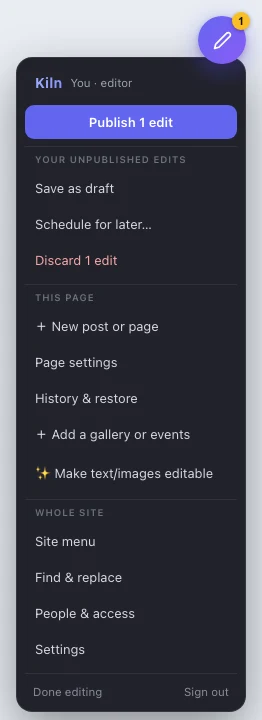
Done editing hides Kiln so you can browse normally (you stay signed in; a small ✎ Resume editing button brings it back). Sign out ends the session.
Publishing & undo
Edits are staged on the page, then published together as one save. Undo works like Canva.
As you change things, each edit gets a yellow outline and the Publish button counts them (Publish 3 edits). Nothing is live yet. Press Publish and a sheet shows every change before and after, where you can drop one and write a note; publish from there and Kiln writes all the page’s staged edits to your repository in one commit; your host rebuilds and the change is live about a minute later. Publish status is deploy-aware: Live ✓ — view site when your host’s deployment actually landed (with a content-probe confirmation), or Build failed — open commit when it didn’t. You can keep editing while a publish is in flight; anything you change mid-publish simply stays staged for the next one.
Undo & redo
- ⌘Z / Ctrl+Z undoes your last staged change: a text commit, a block move, an image swap, an added section, a restore. ⌘⇧Z / Ctrl+Y redoes it. Small ↶ ↷ buttons also appear by the Kiln button whenever there's something to undo.
- While you're typing inside a field, the browser's normal text undo applies; Kiln's undo works at the level of whole saved changes.
- Esc (or Revert) throws away the edit you're currently in. Clicking away keeps it staged.
- Discard edits throws away everything staged and reloads.
- If your browser crashes with staged edits, Kiln offers to restore them on your next visit.
Editing text
Click outlined text to turn it into a live editor with a toolbar.

- Style menu: paragraph / heading / subheading / quote, plus any site styles your developer defined, so text stays on-brand.
- B / I / U, bullet and numbered lists, and Clear to strip formatting.
- Link (chain icon): select text first, then paste a URL or a path like
/contact.html. - Image and 📄: insert a picture or an uploaded document at the cursor.
- ↻ clock: this section's own history; see History.
The toolbar is draggable: grab the ⠿ handle if it's in your way. Editing a link also shows a destination box and Attach file… to point it at an uploaded PDF. To follow a link while editing, Cmd/Ctrl-click it. Clicking into a field and back out without changing anything never creates a phantom edit.
Images & resizing
Click an editable image for its toolbar; drag the corner handle to resize.

- Replace image… uploads a new picture, auto-compressed for the web so a big phone photo doesn't slow the page.
- Drag the ● corner handle to resize how the image displays. Kiln keeps a large copy (up to 2400 pixels wide) beside the one it publishes at the size you chose, so if you enlarge it again later, the published copy is remade from the large one rather than from the small one.
- The text box on the toolbar is the image's alt text: a one-line description for screen readers and search engines. Fill it in.
Right after upload you see a local preview; the file itself is committed with your next Publish (nothing orphaned if you discard). Pictures inside a paragraph get their own width controls and a remove button when clicked.
Documents
Put a PDF or file on a page as a link, a chip, or a card.
- Attach to a link: click the link, then Attach file….
- Insert in text: while editing, click 📄, pick the file, then choose how it appears: a plain text link, a bordered chip, or a card with the file type and size. Rename the label before inserting.
- When clicked: choose whether the document opens in a new tab (good for PDFs people read) or downloads directly.
Files live in your repo under assets/files/ (on a members-only page they go to the gated members/files/, so only signed-in members can open them). The limit is 15 MB per file.
Blocks, lists & tables
Repeating things: cards, team members, document lists, schedule rows.
Hover any block and controls appear in its corner:
- ↑ ↓ move it, or drag the block to reorder.
- + duplicates it (then edit the copy). ✕ removes it.
- 🏷 tags it (next topic).
- + Add block under the list appends a copy, ready to edit.
This works for table rows too: a schedule marked as a block list gets the same controls per row, and Kiln preserves table structure exactly.
Tags & filters
Tag blocks and visitors get filter buttons automatically.
Press 🏷 on any block and type comma-separated labels, like new, used, upcoming. The moment one block in a list is tagged, a filter-button preview appears above the list while you edit: All plus one pill per tag. Publish, and every visitor gets those same buttons; clicking one hides everything without that tag. No setup beyond the tags.
Photo galleries
A thumbnail grid for editing; a full-screen viewer for visitors.
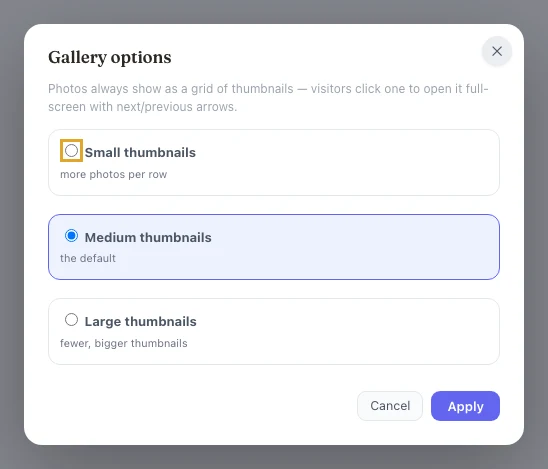
- + Add photos takes several images at once: each is compressed and added to the grid with an editable caption. Reorder and remove like any block.
- ⚙ Gallery options sets the thumbnail size (small, medium, or large) per gallery.
- No gallery on the page yet? + Add a gallery or events in the Kiln menu drops a ready-to-fill section onto the page (staged like any edit, and live only when you publish).
Visitors see the thumbnail grid; clicking a photo opens it full-screen with prev/next paging, captions, arrow keys, and swipe.
Events & calendar
List events; visitors switch between list and calendar views.
- + Add event opens a form: title, date, start/end time, location, an optional link, and details. Kiln keeps the list in date order.
- 📅 on an event reopens the form to change it.
Visitors get List / Month / Week / Day buttons above the events. Month view is a real calendar grid; clicking an event shows its details. It's all rendered from the same content you edited. There's no separate calendar to keep in sync.
Comments & reviewers
Figma-style review on the live page.
💬 Comments pins a comment to any element. Threads keep who said what; you can resolve or reopen them. Each page has a sidebar and an open-count badge. A Reviewer preset in People & access creates a true comment-only seat: they can talk about the page and they cannot change it.
Suggest mode
Editors propose; you approve. Enforced on the worker, not just in the browser.
Tick Suggest-only publishing on an editor and their Publish becomes Suggest changes. Field-level suggestions land in an admin review queue with a per-field before/after. Approve re-applies onto the current page (conflict-safe; the suggester keeps authorship) or Decline throws it out. Suggest-mode sessions cannot write to the live branch, schedule, or bypass via the proxy.
⌘K palette
Jump, or search the site’s own text.
Press ⌘K (Ctrl+K on Windows) to jump to any page, field, or tool. The same palette searches the site with in-context snippets, scoped to what an invited editor is allowed to see. On a generator-built site it lists the pages the built site serves, each with its title, and searches their text.
Block library
Editors compose pages only from approved, brand-safe sections.
+ Add section sits between sections and is fed by _blocks/*.html snippets you (or an AI) author in the repo. Sections with a repeat key get a ✕ remove. Nothing here is a freeform page builder. If it is not in the library, it is not on the page.
Theme
The site’s :root CSS variables are the brand kit. No schema.
The Theme panel turns those custom properties into color pickers, font menus, and size inputs, with a live preview. Saving writes a byte-exact stylesheet commit. The CSS is the source of truth.
On a phone
Same editor, reshaped for thumbs.
On a phone the editor becomes bottom sheets with thumb-sized targets and a keyboard-aware toolbar. Desktop is unchanged. Update your hours from the parking lot.
Posts, pages & the menu
Add to the site and manage navigation.
- + New post or page creates a blog post (article + listing card, in one commit) or a standalone page from your template. Kiln gives you the link the moment it's live.
- Site menu edits your navigation (add, rename, reorder) and applies it to every page in one publish. Add new pages here so people can find them.
- Page settings edits the browser-tab title, the search-result description, and the social-share image. It's also where an owner can delete a page.
Drafts & scheduling
Work privately, publish later.
- Save as draft stores your staged text edits without publishing them. New images and added sections can't ride in a draft; publish those first. Next time anyone opens the page in Kiln, it offers to resume the draft or publish it, and the owner can also delete it.
- Schedule for later… publishes your staged edits automatically at a time you pick. Your edits re-apply against the live page at that moment, so anything published in the meantime is kept.
- One
previewconfig line turns drafts and suggestions into real, shareable branch-preview URLs built by your host. See Configuration.
History & rolling back
Every publish is a saved version. Name one if you like. Undoing always previews first; nothing goes live until you Publish.
You can name any publish (git tags under kiln/) so “summer menu” is easier to find than a hash. History & restore in the menu lists this page's versions in plain language (“Edited hero headline and 2 more”, “Added 3 photos”), each with who and when. Two things you can do with any version:
- Undo this change: takes back just what that one publish changed, leaving everything since intact. Works on the newest (live) item too.
- Go back to this: returns every section of the page to how it was at that point.
Either way, every restore first shows the result on the page itself, under a bar with Cancel and Keep, before anything is staged. Keep it and it stages like any other edit (⌘Z undoes it); cancel puts everything back. Nothing touches the live site until you hit Publish.
One section's history
Click into any section and press the ↻ clock on its toolbar to see just that section's past versions, with a text preview of each. Pick one to preview it in place, with the same Keep and Cancel. This is the fastest way to fix “someone rewrote this paragraph last week and I want the old one back.”
Find & replace
Change a phrase everywhere at once.
Find & replace scans your site's pages (up to 100 HTML files) for a phrase, like an old phone number, a name, or an address, shows where and how many times it appears, and replaces them all in one change. Preview first, then Replace all.
People & access
Owner only. Add editors, reviewers, and members by Google email; scope editors to pages and sections.
- Editor: edits content. Scope them with ▾ Choose pages (a checklist of your site's pages and folders) and ▾ Choose sections, a per-page list of the site's editable sections, each shown with the first words of its content so you can tell what it is. Outside their scope, editors see the page read-only with a note about where they can edit. Tick Suggest-only publishing and their Publish becomes Suggest changes; see Suggest mode.
- Reviewer: a comment-only seat (
mode: review). They pin comments on the live page; the worker refuses every write for those sessions. - Member: no editing; can view members-only pages and files after signing in.
- Tools: per editor, tick which menu tools they get. There are eleven boxes, twelve on a worker with an AI key: page settings, history & restore, drafts, new posts & pages, scheduling, site menu, theme, find & replace, comments, AI assist, adding sections from the block library, and make-editable. The first three are ticked to begin with. Editing text and images is always allowed; People & access and site Settings stay owner-only.
- Access lasts 1 to 360 days or never expires. Remove ends an editor's access immediately, including any open session. A removed member can't sign in again, and a browser where they are already signed in loses the members pages within about five minutes.
Changes editors publish are attributed to them by name in the site's history. When several people are signed in, the menu shows who's online and which page each person is on.
For members
A member signs in by visiting any members-only page (or the members sign-in page) and pressing Continue with Google, using the exact Google email the owner added. That unlocks the gated pages and files for the number of days the owner set; when it expires, they sign in again. The gate is a Cloudflare Pages Function, so a members area needs the site hosted on Cloudflare Pages: on another host, files under /members/ are not protected.
Making things editable
The owner, or an editor given the Make things editable tool. Turn any part of the page into something editors can change.
Open ✨ Make text/images editable in the Kiln menu. Everything you hover gets a green outline; click an element and choose what it becomes:
Click-to-edit, with or without formatting.
Click to replace, resize, set alt text.
Add / reorder / remove / tag the items inside.
Managed navigation, synced across pages.
Kiln writes the change into your site's actual HTML (committed like any edit) and the element is editable right away. Click something already editable (red outline) to remove editing from it; the content stays, only the handle goes.
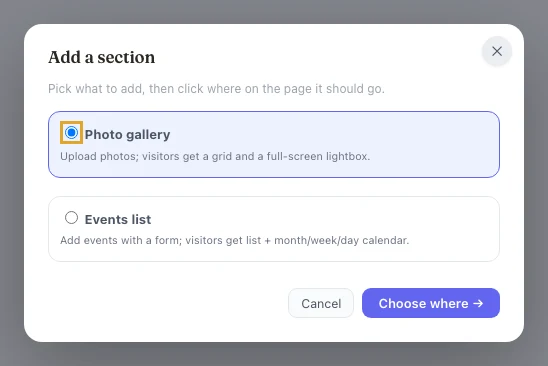
Adding new galleries or event lists is its own menu item, + Add a gallery or events, because those add a new section to the page rather than making an existing one editable. Approved brand sections from your _blocks/ library are added with + Add section; see Block library.
Editing at the same time
Two people, one page, no lost work.
When someone else has the page open in Kiln you'll see a note: "Susan is also editing this page." Edit different things and both save cleanly. Edit the same text and whoever publishes second gets a warning naming the overlap, with two honest choices: Reload & review (your edits are kept and offered back) or Publish mine anyway. Nothing is ever silently lost: every version stays in History.
AI assist
Optional, and Self-hosted only. Bring your own API key. Kiln does not sell a hosted AI plan.
Improve / Shorten / Tone / Translate / Custom on any field, with a before/after preview; one-tap alt text for images; and “draft the content” on new posts. It needs an API key stored as a secret on a worker you run (npx wrangler secret put AI_API_KEY), so it works on Self-hosted only. Kiln Cloud and Fully managed sites do not have it, because there is nowhere for you to put a key. Same sanitizer and commit pipeline as a human edit, and you grant it per editor.
Configuration reference
/assets/kiln-config.js: the one config file.
window.KILN = {
  repo:   'you/your-site-repo',                  // GitHub owner/name
  branch: 'main',                                // branch Kiln commits to
  worker: 'https://kiln-auth.you.workers.dev',   // your (or our) sign-in worker
  styles: [],                                    // site CSS classes for the Style menu
};| Key | Required | What it does |
|---|---|---|
repo | yes | The GitHub repository (owner/name) Kiln reads from and commits to. |
branch | no | Branch to commit to. Default main. |
worker | yes | URL of the sign-in worker. Self-hosted: your workers.dev URL. Kiln Cloud and Fully managed: ours (set for you by the prep command). |
styles | no | Array of {label, class} entries exposed in the text toolbar's Style menu, so editors can only apply on-brand styles. |
root | no | Subfolder of the repo the site is served from, if not the repo root. |
home | no | Where people land after signing in at /kiln, and after signing out. Default /. |
mode | no | Set to 'source' on a generator-built site so Kiln edits its content files (see Source mode). Leave it out on a plain HTML site. The wizard writes it for you. |
adapter | no | Which generator, when mode is 'source'. Only 'astro' exists today. |
draftField, draftValue | no | In source mode, the front matter field that marks a draft, and the value that means draft. Leave out for draft: true. |
orderField | no | In source mode, the number field a collection is ordered by, when it is not called order, sort, weight, position or priority. |
siteName | no | Display name shown on the /kiln sign-in screen. |
entry | no | Set false to disable the /kiln entry page handling, or a string path (e.g. '/edit') to use a custom entry path instead of /kiln. |
auth | no | Sign-in options. auth: { google: false } hides the Continue with Google button on the sign-in screen. |
preview | no | One line like preview: 'https://{branch}.yourproject.pages.dev' turns drafts and suggestions into shareable branch-preview URLs from your host. |
Annotation reference
Plain HTML attributes mark what's editable. Your AI (or the wizard) usually writes these.
| Attribute | On | Makes it |
|---|---|---|
data-cms="key" | any text element | Click-to-edit rich text. The key names the section (e.g. hero_headline). Keys are per page and show up in history and access scoping. |
data-cms-plain | a data-cms element | Plain text only, with no formatting toolbar (dates, prices, kickers). |
data-cms-attr="src" | <img> | A swappable image: replace, drag-resize, alt text. |
data-cms-repeat="key" | a container | Repeating blocks: every child becomes add/duplicate/reorder/remove/tag-able. Works on lists, card grids, and table sections. |
data-cms-menu="key" | your nav | The managed site menu, editable once and synced across every page. |
data-kiln-gallery | a data-cms-repeat | A photo gallery: multi-upload, captions, thumbnail grid, visitor lightbox. Thumbnail size via data-kiln-thumb="120|180|260". |
data-kiln-events | a data-cms-repeat | An events list: structured event form for editors, list + month/week/day calendar for visitors. |
Everything else (tags/filters, documents, members areas, blog templates) is covered in KILN_PROMPT.md, written so you can hand it to an AI along with your repo.
REST API & kiln-mcp
The page is the schema. Shipped in v0.4.0.
Three endpoints on the same worker the editor already uses, behind an owner-minted Bearer token scoped by path, section keys, read-only, and expiry:
GET /api/v1/pages: pages this token may seeGET /api/v1/fields?path=/: that page’s editable fields as JSONPATCH /api/v1/edits:{ path, edits, message? }where each edit is{key, html}or{key, attr, value}. One sanitized, attributed commit.
On Kiln Cloud the worker is https://auth.kilncms.com. Self-host, it is yours. kiln-mcp is an MCP server over that API: list pages, read fields, apply edits. Setup is in the kiln-mcp README, and the marketing page is API.
Troubleshooting
Quick answers to the common ones.
- Signed in, and there is no Kiln button? That page does not load Kiln. Check that it has the two script tags (Kiln Cloud step 2, Self-hosted step 4) right before
</body>, and that the change is pushed and deployed. - "Publishing…" for a while: your host is rebuilding. Kiln keeps checking and will flip to Live ✓ or Build failed; the change is already a commit.
- A new image looks broken after publishing: the deploy hasn't finished; Kiln swaps in the real image when it's live.
- Sent back to the sign-in screen: your session expired (or your access changed). Sign in again at
/kiln. - "You're not on the list (yet)": the owner needs to add your exact Google email under People & access.
- Made a mess? History → Go back to this on the last good version: preview it on the page, keep it, publish. Every publish is kept forever.
- Want a health check?
npx github:kilncms/kiln#release doctorchecks the worker, the GitHub App, the editor files on your live site, whether your host deploys from the repo, and the members gate. It does not look at what you have tagged as editable. - Something else? Open an issue or email info@kilncms.com.