 Kiln
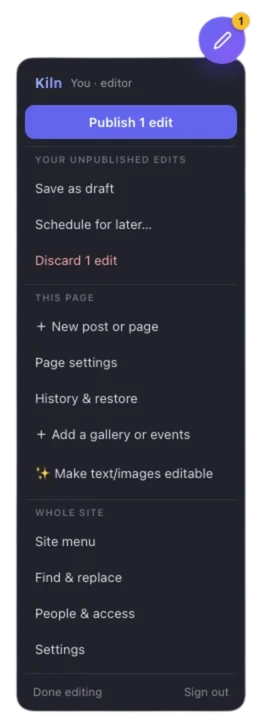
KilnEdit your website by clicking it.
Click the words on your own page, type, and press Publish. Your site shows the change about a minute later.
- Click the words. What can change has a dashed outline.
- Type. Here, “Zero itchy tags.”
- Check, then Publish. Each change, before and after.
- Saved. Then Undo, which is saved too.
Underneath, each change is saved as a new version of your site’s files, in your own GitHub account. Nothing is locked inside Kiln.
Were you sent a link to edit a site? Your guide is here.
Publish saved a version of your site, with a note.
Edit index.html: hero_headline (via Kiln)
The edit from the recording, as it is saved on your own site. The note is the one Kiln writes.
It lands in your GitHub account.
GitHub is a free service that keeps a website’s files and every earlier version of them. Your site lives there, not with Kiln. New to GitHub?
Your host puts it live.
Cloudflare Pages, Netlify, Vercel or GitHub Pages sees the new version and rebuilds the site, usually in under a minute. Kiln shows Live ✓ once visitors can see it.
Every version stays.
History lists each publish with a name and a time. Any of them can be brought back, and you see it on the page before it goes live again.
Leaving is two lines.
Delete Kiln’s two script tags from your pages. The site keeps working, with every edit anyone made still in it.
One editor, three ways to run it. Pick who sets it up.
Run it yourself
$0 open source
For developers at home in a terminal. You run Kiln’s small sign-in service on your own free Cloudflare account, and the setup tool does most of the work. Plan on 30 to 45 minutes the first time.
How to run it yourselfKiln Cloud
$4.99 a month per site
For anyone who can run one command in their site’s folder. We run the sign-in service. Your site’s files and your hosting stay on your own accounts. Plan on 15 to 25 minutes if the site already deploys from GitHub. 7 days free, no card.
Start with Kiln CloudFully managed
$14.99 a month per site
For people who want to touch no code. We set your existing site up on Kiln and host it. You need a free GitHub account, and we help you make one. 7 days free.
Start the free trialOn all three your site’s files stay in a GitHub account you own, and you can move between them later. Prices, the trial and billing.
Find the line that sounds like you.
I build sites for clients, and I’m the one who changes the dates.
Send your client a link instead. They sign in with their Google account, click their own words and press Publish. They need no GitHub account and nothing to install. You decide which parts of which pages they can change, and the code stays yours.
Someone sent me a link to edit their site.
You need the link and a Google account for the email address they added. There is nothing to install and nothing you can break for good: every publish can be undone.
I made my site with Lovable, v0 or Bolt, and I can’t change a word of it.
Those tools usually build an app, where the words live inside code. Kiln can freeze it once into plain pages you edit by clicking. The look, the words, the pictures, the links and the phone menu come across. Forms, sign-in and anything else that needed the app running stop working, and a report lists each one.
The freeze is one command, run by someone who has used a terminal before. After it, you change the site in Kiln, not in the AI tool.
I’m leaving WordPress, Squarespace or Wix.
One command copies the pages of your live site (up to 50, unless you ask for more) into plain files you own, takes out the builder’s own scripts and marks the text and pictures as editable. You host those files for free and edit them with Kiln. What ran on the builder’s servers, such as a shop, a booking form or a members login, does not come across.
My site is built with Astro.
Kiln edits the content files your pages are built from, and your host rebuilds the site. Today that is the text of an entry, formatted with the same toolbar (bold, links, lists, headings), and titles, dates, times, numbers and yes/no values. Kiln writes Markdown back in your file’s own style and changes only what was edited; tables, code and MDX components stay exactly as written. Pictures are replaced and described, and link addresses changed, with the new picture put where the site keeps its pictures. Entries are added, copied, removed, made drafts, scheduled and put in order, with History and Page settings. One line per field tells Kiln where each value lives.
What works on which kind of site, today.
npx github:kilncms/kiln#release rescue <address>--render. Forms and other parts that need the app stop working.The host can be any that rebuilds the site when its GitHub repository changes: Cloudflare Pages, Netlify, Vercel or GitHub Pages. Vercel’s free plan does not allow business sites.
Words and pictures change. The design does not.
Editors change what the page says and shows. The layout, the fonts and the colours stay as the site’s builder made them, unless you hand someone the Theme panel.
- Words and pictures
- Bold, italic, links and lists, with the site’s own styles to pick from. Replace a picture, write its description, set its size. Add a PDF or other file to a sentence.
- Lists, galleries, events
- Copy, move and remove cards, rows and team members. Photo galleries with a full-screen viewer. An events list that visitors also see as a calendar.
- Publishing
- A sheet that shows every change before it goes live. Undo, drafts, publishing at a set time, and History for every page.
- People
- Add editors by their Google email and choose which pages, sections and tools each one gets. Suggest-only editors propose; you approve. Reviewers can only comment. Members can open pages only members see, on a site hosted on Cloudflare Pages.
- On a phone
- The same editor, laid out for a thumb.
Every tool, in the docs · The API, for scripts and AI assistants
A kiln turns soft clay into something that lasts.
Kiln turns a click into a saved version of your site, in files you hold. Kiln is open source: the editor, the sign-in service and the setup tool are public on GitHub, under the GNU AGPL-3.0 licence, and free to run on your own accounts.
One thing to know about Kiln Cloud: to save edits to your repository, Kiln holds the access key that GitHub gives it for that repository, as any hosted editor must. Run it yourself and only you hold it.

Asked most often.
Do my editors need GitHub accounts?
No. Whoever owns the site signs in with GitHub. Everyone else signs in with Google. Their changes are saved with their name on them.
Can editors break the design?
They change words, pictures, links and list items. They cannot move boxes around. If you give someone the Theme panel, they can change the colours, fonts and sizes your stylesheet already names, and nothing else.
Do I keep my site if I stop paying?
Yes. Every edit was saved to your own GitHub repository. When a plan ends, the editor stops working on your site, and so do its API tokens and any changes scheduled to publish later. Your site, your files and everything already published stay as they are.
Can I move between the three ways later?
Yes, in any direction, and your repository never moves. What you redo is the setup around it. Going from Kiln Cloud to running it yourself, you set up your own sign-in service and Google sign-in, point the site at it, and add your editors and members again: the list of people, comments, suggestions, scheduled changes and API tokens stay with the old service. Moving to or from Fully managed also moves the hosting.
Does it work with a site my AI built?
If the AI wrote plain HTML, CSS and JavaScript files, yes: paste KILN_PROMPT.md into the same AI with the site and it adds Kiln’s two script tags and marks what can be edited. If it built a React app, which is what Lovable, v0 and Bolt usually make, it has to be frozen into plain HTML once: what that keeps and drops.
Is there an AI writing helper?
If you run Kiln yourself and put your own Anthropic key on your sign-in service, editors can ask it to shorten, reword or translate a field, or describe a picture. It is not part of Kiln Cloud or Fully managed. On every plan, the API lets your own AI assistant edit the site with a key that you limit.
Do I have to host on Cloudflare?
Your site can be on any host that rebuilds it when the GitHub repository changes: Cloudflare Pages, Netlify, Vercel or GitHub Pages. If you run Kiln yourself, its sign-in service runs on Cloudflare’s free Workers plan.
Who charges my card?
Lemon Squeezy, our merchant of record. Plans are monthly; cancel any time and keep editing to the end of the month you paid for. Pricing has the rest.